Lexus
- 4.7
- Rating
- 500.00K
- Installs
- Free
- Price

 Analysis by App-foxy
I approached Lexus as a practical companion for owning and using a compatible vehicle, rather than as another app I would open for entertainment. That distinction matters. Its value depends heavily on the car in your driveway, your region, and the way you prefer to handle everyday vehicle tasks. When those pieces line up, the app can make ownership feel more organized. When they do not, it is easy to expect more than it can reasonably provide.
Developed by Lexus Mobile Apps, this free Auto & Vehicles app is aimed at Lexus drivers and is suitable for Everyone. It supports vehicles from 2010 onward, with a newer vehicle requirement for Hawaii. That compatibility rule should be the first thing you check before spending time setting up an account or changing your routine around it.
The app has built a strong audience, with an average rating of 4.5 from around 35 thousand ratings and more than 500 thousand installs. Those figures suggest that many owners find it useful, but they do not make it universally suitable. My impression is that Lexus works best when you treat it as a supporting tool for ownership, not as a replacement for the vehicle’s controls, the manual, or a service department.
You May Also Like

 Google Keep - Notes and lists
Google Keep’s Quiet Growth Shows the Appeal of Simpler Notes
As mobile work gets busier, Google Keep keeps winning a simple contest: capture a thought quickly, find it later, and get on with the day.

 Blood Strike: 2.5 Anniversary
Blood Strike’s Loadouts Turn Every Drop Into a Tactical Gamble
A close look at Blood Strike’s custom loadouts: how fast access to signature weapons reshapes its battle royale rhythm, rewards preparation, and narrows the gap between fights.

 Pandora - Music & Podcasts
Pandora’s Music Is Easy to Start, but Harder to Recover
Pandora’s strength is its low-effort path from a seed to a station. Its weak spot is how much confidence it asks you to place in connection, setup, and quiet recovery.

 8 Ball Pool
 Is Built on Rivalries, Rematches, and Routine
A close look at the rivalries, rematches, shared routines, and unanswered safety questions that turn a quick pool match into a persistent mobile community.

 Samsung Music
’s Quiet Strength Is Playing What You Already Own
Its reach comes less from spectacle than from dependable access to a personal library. That simplicity is both the app’s strongest retention engine and its ceiling.

 AccuWeather: Weather Radar
AccuWeather Review: A Quick, Clear Forecast for Everyday Decisions
For everyday plans, the best forecast is the one you can understand quickly. AccuWeather makes rain timing, radar, and local conditions easy to act on, with a few trade-offs.
More From Our News Desk



How I would build a dependable Lexus routine
I’d build a dependable routine around a few simple checks rather than expecting the app to handle every part of car ownership. I’d confirm that I’m viewing the right vehicle, use Lexus when I have a specific task in mind, and compare anything important with the car itself. That approach keeps the app useful without making it the sole source I rely on.
Start with compatibility, then keep the workflow simple
My recommended starting point is deliberately unexciting: confirm the model year and location before exploring anything else. The app currently supports 2010 or newer vehicles, while Hawaii requires a 2018 or newer vehicle. That regional exception is important because a driver can otherwise assume that an older supported model will work everywhere.
Once compatibility is established, I would use the app around a small number of repeatable habits. Check it when preparing for a trip, use it as a reference point when ownership details are easy to forget, and return to it when a vehicle-related task needs attention. A restrained workflow is more useful than opening every screen simply because it exists.
This is also where I would set expectations for older vehicles. Support for a model year does not mean every capability will feel identical across the Lexus range. The age and equipment of the vehicle can affect what is useful in practice. I would therefore judge the app by the functions available for my specific car, not by what another Lexus owner describes.
For a realistic everyday example, imagine leaving work on a cold or rainy evening. Instead of searching through old messages, paperwork, or several unrelated apps, I would first open Lexus to orient myself around the vehicle information available there. If the app helps with the task I need, it saves a small amount of friction. That may sound modest, but repeated small improvements are exactly where a vehicle companion earns its place.
Use it as a reference, not as a substitute for judgment
I found the most sensible mindset is to let the app organize information while keeping important decisions grounded in the car itself. A phone screen is convenient, but it should not become the only source I trust for a warning, a maintenance concern, or a safety decision. If something looks urgent, I would still inspect the vehicle and consult the appropriate Lexus documentation or professional help.
That approach also prevents a common mistake: assuming that a digital status view is always current enough to replace a physical check. Vehicle information can depend on communication between the phone, the app, and the car. If a displayed detail seems unexpected, I would refresh my understanding rather than immediately treating it as proof that the vehicle has a mechanical problem.
The best Lexus habit is to use the app for convenience while keeping the car’s manual and real-world condition as the final reference. That balance makes the experience more dependable and avoids turning a helpful ownership tool into a source of unnecessary worry.
Make the app part of an ownership rhythm
I would not recommend checking it constantly. A better pattern is to attach it to moments that already happen: before a longer drive, after returning from a service visit, or when preparing to lend the car to someone in the household. Linking the app to an existing habit makes it easier to remember without creating another notification-driven routine.
For families sharing a vehicle, this can also reduce confusion. One person may know the car well while another only drives it occasionally. Using the app as a common reference can help the less frequent driver become familiar with the vehicle’s information without needing to ask the same questions repeatedly.
There is a trade-off, though. If you rarely need vehicle information from your phone, the app may feel unnecessary. A driver who prefers the dashboard, printed documents, and direct contact with a dealer may gain little from adding another digital layer. Lexus is most convincing for owners who already use their phone to organize practical tasks.
Settings and account details worth checking first
Rather than changing every available option immediately, I would review the settings that affect how the app fits into my day. I would check whether the correct vehicle is associated with the account, confirm that personal details are accurate, and review notification choices so that useful reminders are not buried under noise.
This is a small but meaningful distinction: settings should support a workflow, not create one. If a reminder is helpful, keep it visible. If repeated alerts make you ignore the app, reduce the clutter. The goal is to make the information easy to act on when it matters.
I would also revisit the setup after buying, selling, or changing access to a vehicle. Ownership apps can become confusing when an old car remains in an account or when several drivers assume they are looking at the same vehicle information. Cleaning up that context is more valuable than learning a shortcut and then using it on the wrong car.
What to do when the app does not behave as expected
When a vehicle app appears out of date, my first step would be to separate a display problem from a vehicle problem. I would check the phone connection, reopen the app, and compare the information with the car itself. If the mismatch remains important, I would use Lexus support or the relevant vehicle documentation instead of repeatedly tapping the same screen.
This is one of the less glamorous realities of connected ownership: convenience depends on several moving parts. The app can make information easier to reach, but it cannot remove every delay or communication issue. Experienced use means knowing when another check is more sensible than waiting for the phone to catch up.
Faster patterns for regular drivers
After the initial setup, I would keep the app’s most useful tasks close to the top of my personal routine. I would avoid browsing through unrelated areas when I already know what I need. Open it with a question in mind, complete that task, and close it. This sounds obvious, but it prevents the app from becoming a slow replacement for a simple glance at the car.
A second useful pattern is to check information before leaving rather than after a problem appears. For example, before a long journey I would use the app as one part of preparation, alongside checking the vehicle, planning the route, and making sure I have what I need. That makes the app a planning aid instead of an emergency tool.
For occasional drivers, I would keep a short mental checklist: vehicle compatibility, account access, current vehicle selection, and notification preferences. These are the areas most likely to cause avoidable frustration when someone opens the app after a long break. A quick review is faster than assuming the app has become unreliable.
My practical shortcut is not a secret feature; it is consistency. Using the same sequence each time makes the app feel faster because I spend less time deciding where to look. That is especially useful when I am standing outside the car, carrying bags, or trying to leave on time.
Where Lexus is stronger than ordinary alternatives
The main advantage over relying only on the vehicle’s dashboard is access to ownership information through a phone. A dashboard is excellent while sitting in the car, but it is not available when I am at home, in a parking area away from the vehicle, or helping another driver prepare. Lexus gives the ownership experience a second point of access.
Compared with a generic notes app, calendar, or folder of screenshots, a manufacturer-specific app has a clearer relationship with the vehicle. I would rather start with a Lexus-focused tool than assemble scattered reminders and documents myself. That said, a calendar may still be better for a simple service reminder, and the owner’s manual remains better for detailed explanations and model-specific instructions.
Compared with a dealer conversation, the app is more convenient for routine information, while the dealer is better when a question requires diagnosis, repair advice, or a decision involving the vehicle’s condition. These are complementary options, not direct substitutes. Expecting the app to solve a mechanical issue would be the wrong comparison.
Important limits for advanced users
The first limit is compatibility. The app is not a universal vehicle manager, and the supported model-year rule immediately excludes some Lexus owners. The Hawaii exception makes checking eligibility even more important. If your vehicle falls outside the supported range, the app should not become the center of your ownership plan.
The second limit is variation between vehicles. Even when two cars belong to the same brand, their equipment and age can lead to different experiences. I would not judge my own setup by assuming that another owner sees exactly the same information or has the same workflow.
The third limit is that a phone-based view cannot replace physical awareness. It cannot tell me everything that a walk-around inspection, dashboard warning, or qualified technician can tell me. Owners who want a complete remote command center may find the experience more limited than expected, especially if they are comparing it with highly connected services from other manufacturers.
Privacy and attention are also practical considerations. Any app connected to vehicle ownership deserves a thoughtful approach to account access and notifications. I would use a strong personal routine around signing in and sharing access, and I would avoid giving the app more attention than the task requires. Convenience is not automatically worth constant checking.
Who should use it, and who should skip it?
I would recommend Lexus to owners of compatible vehicles who want a central phone-based companion for routine ownership tasks. It is particularly suitable for people who move between home, work, and shared parking areas, or for households where more than one person drives the same Lexus.
It also makes sense for drivers who dislike keeping vehicle information in several places. Having a manufacturer-specific app can be cleaner than relying on memory, paper, and unrelated phone tools. The free price removes a financial barrier, so the main question is usefulness rather than subscription value.
I would be more cautious if you own an older or regionally restricted vehicle, rarely use smartphone services, or expect the app to provide a complete diagnosis whenever something feels wrong. In those cases, the dashboard, manual, service records, and dealer support may be more dependable or simply quicker.
My final assessment after using it as an ownership tool
Lexus is a sensible, focused app for compatible Lexus owners, but its appeal comes from disciplined use rather than a long list of dramatic features. I like it most when it reduces small ownership annoyances: finding the right information, preparing for a drive, and keeping a shared vehicle routine less scattered.
The rating of 4.5 and the broad install base show that it has found a real audience, while the free cost makes it easy to try. Still, those positives should be weighed against the model-year and regional requirements, the possibility of different experiences between vehicles, and the fact that a phone cannot replace the car itself.
My verdict is straightforward: install it if you own a supported Lexus and want a cleaner digital routine around the vehicle. Set it up carefully, keep notifications purposeful, and use it before ordinary trips rather than only during stressful moments. If you want extensive control over every aspect of the car or need mechanical answers, choose the manual, the dashboard, or professional service instead. For the right owner, Lexus is not revolutionary, but it is a useful everyday layer that can make ownership feel more manageable.
FAQs for Lexus
01What features does the Lexus app offer?
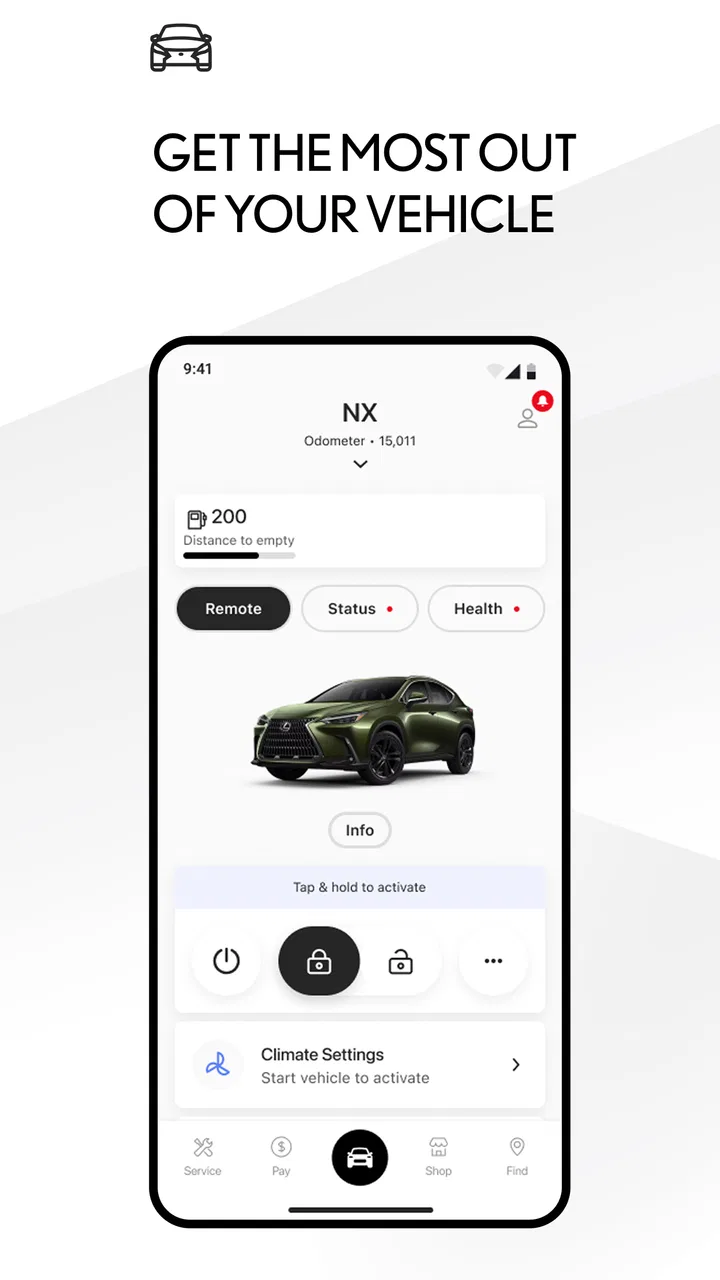
The Lexus app provides a range of features including remote start and stop, vehicle finder, and real-time notifications. Users can also schedule service appointments, access roadside assistance, and monitor vehicle health. Additionally, the app allows integration with smart home devices for a seamless user experience.
02Is the Lexus app compatible with all Lexus models?
The Lexus app is designed to be compatible with a wide range of Lexus models, especially the newer ones. However, certain features may only be available for specific models. It’s recommended to check the compatibility section on the app’s website or within the app store description before downloading.
03How secure is the Lexus app?
Security is a top priority for the Lexus app. It uses advanced encryption to protect user data and secure transactions. Regular updates are provided to address any potential vulnerabilities. Additionally, users are encouraged to enable two-factor authentication for added security.
04Are there any subscription fees for using the Lexus app?
The Lexus app itself is free to download, but some features may require a subscription. For instance, advanced remote services and vehicle health reports might be part of a premium package. Users can explore different subscription options within the app to find the best fit for their needs.
05Can I control multiple vehicles with the Lexus app?
Yes, the Lexus app allows users to manage multiple vehicles from a single account. This is particularly beneficial for families or individuals with more than one Lexus vehicle. Users can easily switch between vehicles to access specific features and controls for each one.
Pros
- Smooth and intuitive user interface.
- Extensive customization options.
- Real-time vehicle diagnostics.
- Comprehensive navigation features.
- Seamless integration with smart devices.
Cons
- Limited compatibility with older models.
- Occasional app crashes reported.
- Requires constant internet connection.
- High data usage for updates.
- Limited third-party app support.

Lexus
Gallery